I have used and programmed in both languages professionally and academically.
For C#, I prefer VS studio or its light weighted version VS code whereas Java, I prefer Eclipse or NetBean.
These two languages are high level languages object oriented programming languages where it uses Class and Object for organizing code and code reusability/scalability.
These two programming languages are quite similar, in my own opinion it is 88% similar since they operate based on the same concept of OOP e.g Class, Object, A. P.I.E (Abstraction, Polymorphism, Inheritance & Encapsulation), Multithreading, Thread-safe capability, Exception Error Handling, Auto memory management with its memory garbage collector, Communication between multithreading, Primitive types and Reference types, Type safety, access modifier. C# supports both strongly type and weakly type like dynamic (runtime type) whereas Java only supports strongly (statically) type.
In short, they both emphasize SOLID capabilities.
S: Single Responsibility principle:
a class should only have one reason to change or in short, a class should only have single responsibility.
E.g: if an employee class has EmployeeSalaryCalculation() and also SaveEmployeeData(), it breaks this principle since these two actions are two different responsibilities and to satify this principle we should separate it to another class e.g Employee class (salary related etc.) and EmployeeReposity (data/db related etc.)
O: Open/Closed principle:
Open for Extention but Closed for modification. In short, it refers to abstract class and sub class where sub class can derive from abstract class and make its own version (extension) of abstract class method (abstract method) but no modication can be made to the abstract method because abstract method has no implementation (Closed for modification).
L: Liskov principle:
In short, it refers to polymorphism. Poly means many form. it refers to the ability of object to take on many forms. e.g a sub class can be used in place of the parent class and its method can change based on the version of each sub class (object can take on many forms). There is two types of polymorphism. Overloading (compile time polymorphism) and overriding (runtime polymorphism). Overloading e.g method overloading where same method name with different number of arguments can behave diferently based on the number of arguments whereas Overriding e.g several diferent sub class override parent class’s method.
I: Interface Segregation principle:
a client should not be forced to implement interface that they do not need or use. In short, we should always try to break big interface into subtle interface so that way it is easy for a client to only implement interface it needs and also since both Java and C# support multiple interfaces implmentation.
D: Dependency inversion principle:
This principle emphasizes the importane of decoupling high level modules from low level module. high level module should not depend on low level module and vice versa through abstraction and interface. In short, we can accomplish this principle through dependeny injection so instead of having low level class as member of our high level class (hard coupling) we should introduce interface and have interface as a member instead so that way the low level classes that implement the interface can be inject at runtime either through constructor or method that accept the interface type as an argument.
Ok let get back to illustrate that both langauge are quite similar. if you can program in C#, you should definitely be able to program in Java easily.
Both support Class and instantiate of the Class aka Object
Both do not support multiple inheritance
Java
-------------------------------------
Class MySubClass extends MySuperClass
C#
-------------------------------
Class MySubClass : MySuperClass
Both support ability to call super class (base class)constructor
Java
super(args)
C#
base(args)
Both support multiple interfaces implementation
Java

class MySubClass implements MyInterface1, MyInterface2
C#
class MySubClass : MyInterface1, MyInterface2
Both support the ability to prevent other classes from inheriting from a class
Java
final class Vehicle {
    void display() {
        System.out.println("This is a vehicle");
    }
}

// This will cause a compile-time error
// Error: Cannot inherit from final 'Vehicle'
class Car extends Vehicle {

}
C#
sealed class Vehicle
{
    public void Display()
    {
        Console.WriteLine("This is a vehicle");
    }
}

// This will cause a compile-time error
// Error: 'Vehicle' is sealed and cannot be inherited
class Car : Vehicle
{
}
Java final field and C# readonly field
Both does the exact same thing: Once assigned, cannot be changed.
Java final method and C# sealed override method
Both does exact same thing: it prevents sub class from overriding the super class method.
Both support Multithreading through Thread class
Java
a) Create Thread through Extend Thread class
class MyThread extends Thread {
    public void run() {
        System.out.println("Thread running");
    }
}

public class Main {
    public static void main(String[] args) {
        MyThread t1 = new MyThread();
        t1.start();

        MyThread t2 = new MyThread();
        t2.start();
    }
}

b)Create Thread through Implement Runnable interface
class MyRunnable implements Runnable {
    public void run() {
        System.out.println("Runnable running");
    }
}

public class Main {
    public static void main(String[] args) {
        Thread t1 = new Thread(new MyRunnable());
        t1.start();

        Thread t2 = new Thread(new MyRunnable());
        t2.start();
    }
}
C# using System; using System.Threading;
class Program { static void Main() { Thread t1 = new Thread(new ThreadStart(Run)); t1.Start();
Thread t2 = new Thread(new ThreadStart(Run)); t2.Start(); }
Both support Exception and Error handling through try/catch/finally block
Java
try {
    // code that might throw an exception
    int result = 10 / 0;
} catch (ArithmeticException e) {
    System.out.println("Cannot divide by zero");
} finally {
    System.out.println("Finally block always executes");
}
C#
try {
    int result = 10 / 0;
} catch (DivideByZeroException e) {
    Console.WriteLine("Cannot divide by zero");
} finally {
    Console.WriteLine("Finally block always executes");
}
Both support throws exception within a method so as for a calling method to handle/catching the exception and log exception appropriately
Note: there is subtle difference where Java support checked Exception (forced checking exception by the compiler so the calling method has to properly handle it) through throw whereas C# does not have checked Exception.
Java
void readFile() throws IOException {
    //code
    throw new IOException("File not found");
}
C#
void ReadFile() {
    throw new IOException("File not found");
}
Both support Encapsulation through access modified e.g private, protected, public etc…
Java Access Modifiers:
Modifier
Class
Package
Subclass
The rest of the World
private
✅ Yes
❌ No
❌ No
❌ No
default (no modifier)
✅ Yes
✅ Yes
❌ No
❌ No
protected
✅ Yes
✅ Yes
✅ Yes
❌ No
public
✅ Yes
✅ Yes
✅ Yes
✅ Yes
C# Access Modifiers:
Modifier
Class
Derived Classes
Same Assembly
Other Assemblies
private
✅ Yes
❌ No
❌ No
❌ No
protected
✅ Yes
✅ Yes
❌ No
❌ No
internal
✅ Yes
❌ No
✅ Yes
❌ No
protected internal
✅ Yes
✅ Yes
✅ Yes
❌ No
public
✅ Yes
✅ Yes
✅ Yes
✅ Yes
Note: in C#
class without access modifier = internal class.
class members without access modifier = private field.
Both support ThreadSafety
First what is thread safe. Thread safe means to prevent race condition between multiple thread. race codition occures when multiple threads access and update a shared resource at the same time. To prevent race condition in multiple thread, C# use lock object and Java use synchronize object so only one thread can acquired the shared resource and update it once at a time.
Both support communication between multiple thread
C# use AutoResetEvent or ManualResetEvent to allow one thread to signal one or more waiting threads that some event has occurred whereas Java uses notify() and notifyAll()
There are a few more but with these it shows that both languages are quite similar so if we can program in C# we can say we can program in Java. Java is an independent platform language and with .net core, it makes c# also an independent platform language.
Both Dispose and Finalizer are used to clear resources. Finalizer is usually used to clear unmanaged resources like file handler, database connection handler, network socket handler etc and usually called by GC (CLR garbage collector) and it usually has performance issue since GC is usually forced to run whereas Dispose is usually used to clear both unmanaged resources and managed resources. Dispose is called manually by the developer so it does not have any performance issue like the Finalizer. To implement Dispose, developer has to implement the IDisposable interface and implement Dispose method.
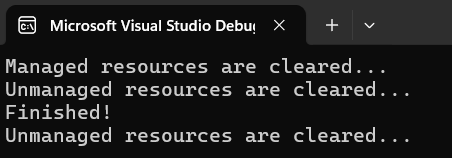
Here is the example to illustrate them in C# console. I used console app so it can be easily demonstrated.
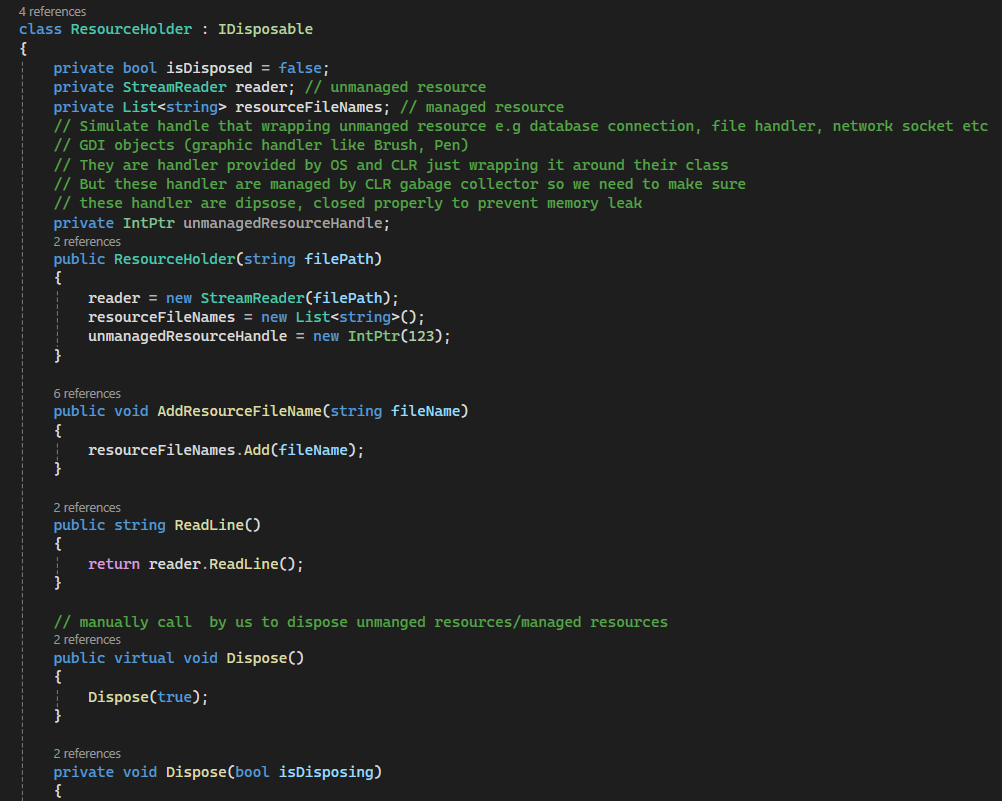
Above, I have a class ResourceHolder that implemented IDisposable interface
In the constructor, I initialized the streamReader (file handler), collection List object , and a pointer that is used to simulate a pointer to the handler of unmanaged resource.
Two public methods that one is for adding a list of file name and Read line by the stream reader
I also have to implement void Dispose(). I made it virtual so any derived class can implement their own Dispose method.
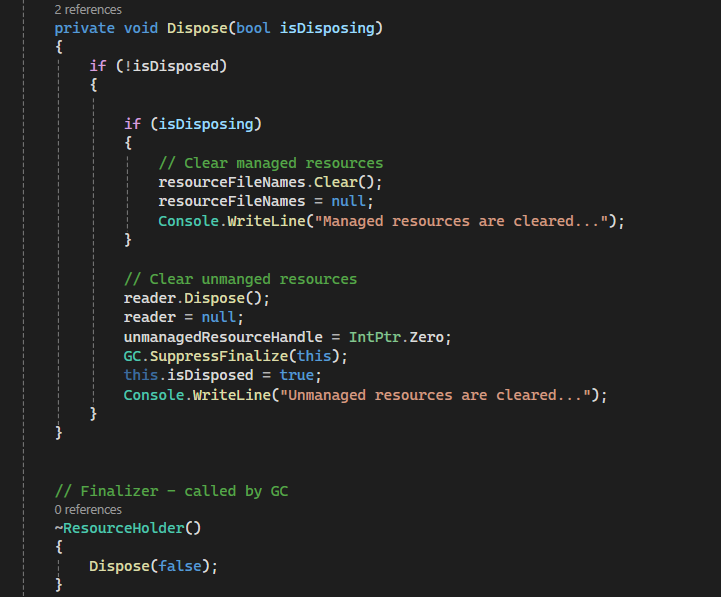
I have a private Dispose(bool isDisposing). isDisposing is used as a flag to indicate whether we want to clear managed resource as well. it is useful when we have to call it from the Finalizer.
We have a flag isDisposed to check if unmanaged resources have already been cleared.
In Finalizer() method ~ClassName(): we call our private Dispose(false) with isDisposing flage = false so to indicate that we only want to clear unmanaged resource.
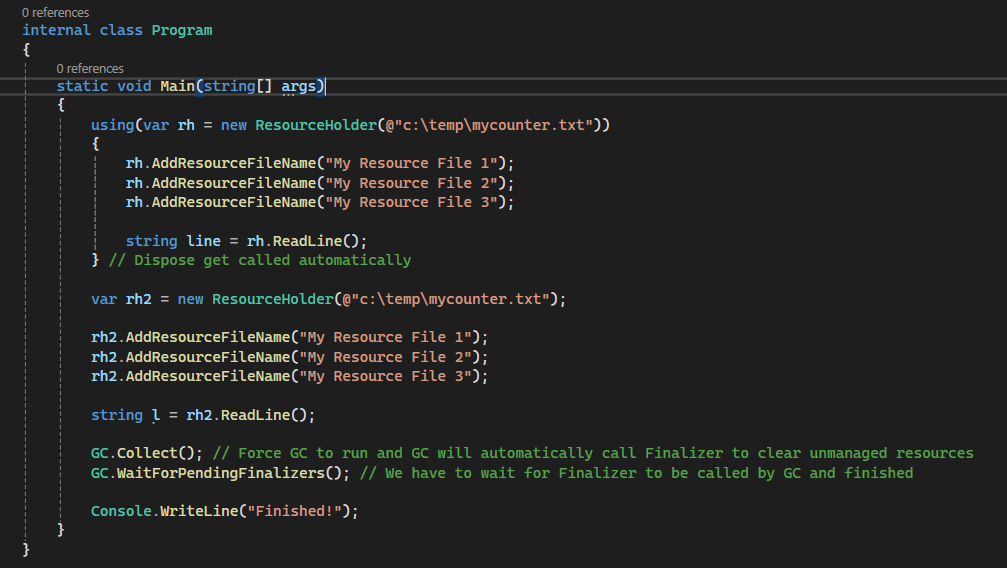
In our main program, we instantiate first object of ResourceHolder rh with using {…} which the compiler knows that it will have to call Dispose method automatically at the end curly bracket.
We also instantiate 2nd object of ResourceHolder rh2 but this time we will use finalizer so we will have to force GC to run by calling GC.Collect and wait for it to finish before ending our demo program with GC. WaitForPendingFinalizers();
reflection is one of the C# .net framework powerful feature which allows application to inspect and interact with metadata of an assemblies like properties, method, type, and assembly at run time.
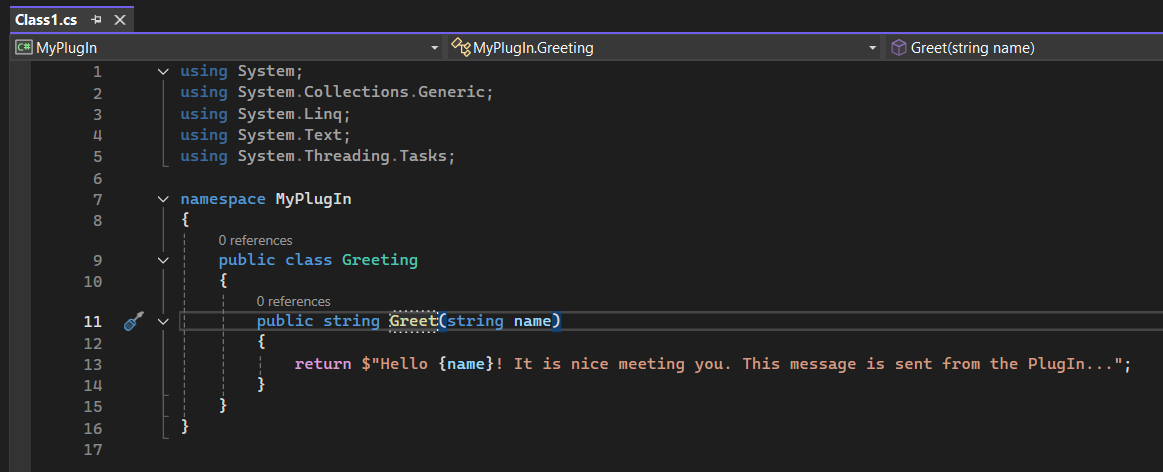
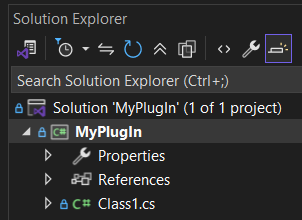
First, we will create a simple plugIn called “MyPlugIn” which is just a DLL library.
It has one function named Greet(name) that takes string value name as an argument and will return a greeting string as seen below
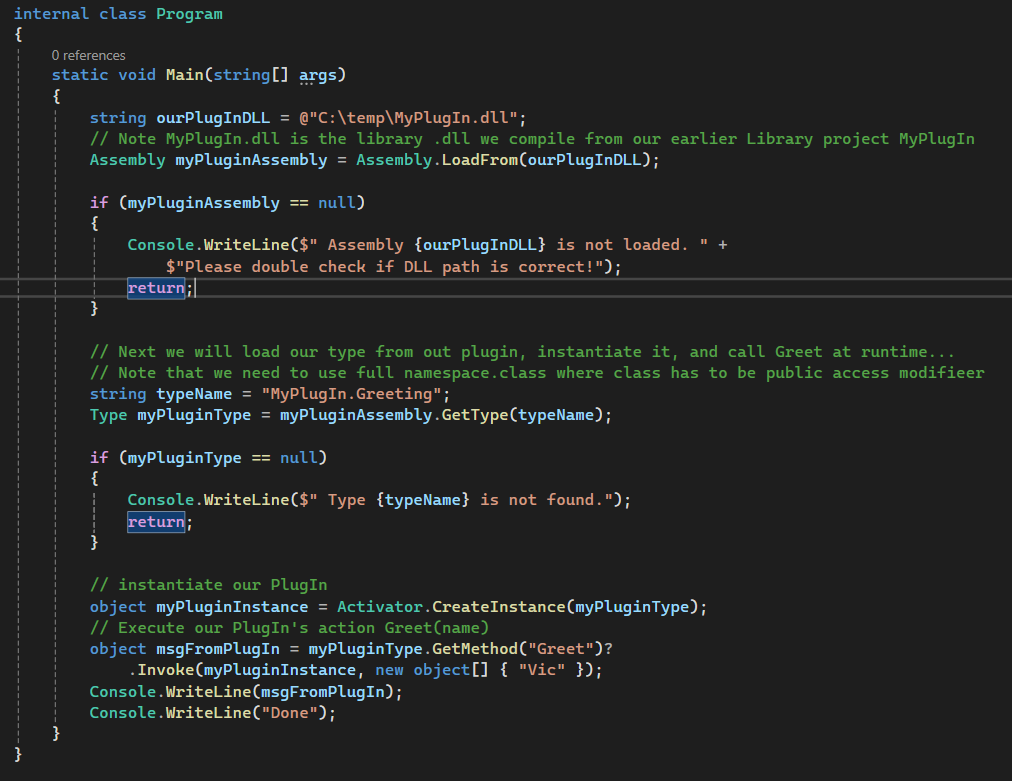
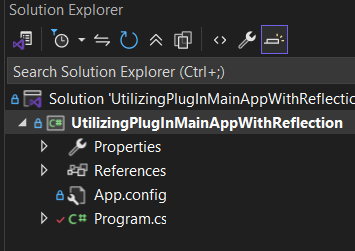
Next, we will create a sample console application that will load this plugin dll which I will store it at c:\temp\MyPlugIn.dll and will instantiate its type and execute its Greet(name) function from the PlugIn at run-time.
This demonstrates just how powerful reflection can be. Throughout my professional career, we’ve relied on reflection extensively in our enterprise applications. I recall a situation where I needed to use a method from an assembly that wasn’t publicly exposed—it was a private method. You might wonder, how did I even know this private method existed? I used a decompiler tool like jetbrains decompiler to inspect the DLL, traced the stack calls, and discovered a method that could assist with the project I was working on. Although it was inaccessible due to its private access modifier, reflection allowed me to invoke this method disregard its access modified and complete my work successfully.
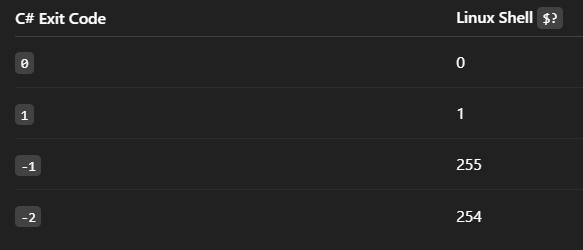
if your program returns -1, the linux shell receives the exit code as an 8-bit unsigned integer (0–255)
So what would be the value that Linux shell would receive if you return -1 from your application?
The kernel takes your int return value and maps it to 8 bits unsigned.
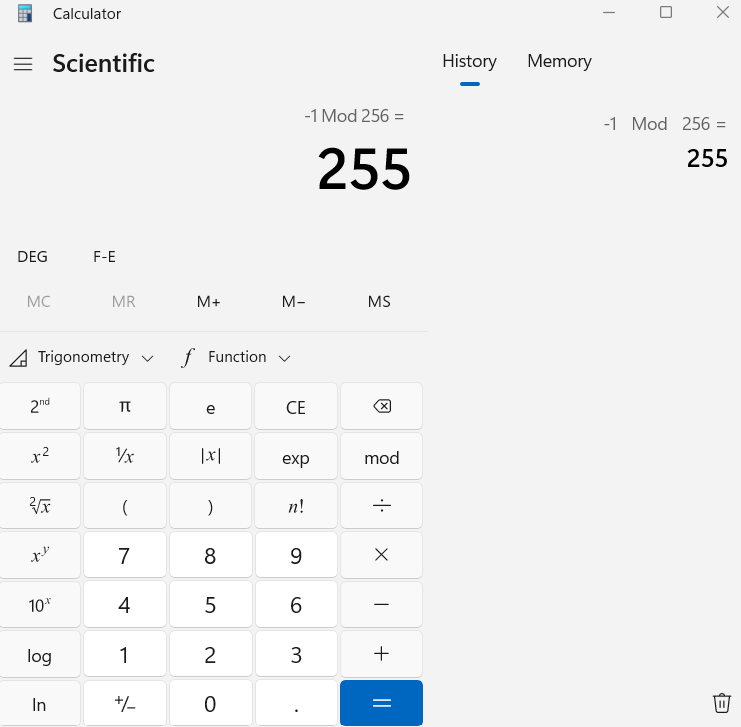
Negative numbers are converted using mod 256:
-1 mod 256 = 255
That’s why when you run:
./myprogram echo $?
the echo will show 255 instead of -1 as you might have falsely expected.
Key takeaway
Linux exit codes are always unsigned 8-bit values (0–255).
Returning negative values in your program gets wrapped modulo 256.
Common convention:
0 → success
Non-zero → error
Tip:
If you want to return an error code to the shell, always use 0–255 to avoid confusion. Returning -1 is technically allowed but becomes 255 in the shell.
Use 0 for success and 1–255 for errors to avoid confusion.
If you want a “standard” error code in Linux, just use 1 instead of -1
This is important to be aware of esp if you develop software using C# with mono or .net core where you might have a bash script that would automate task based on specific exit code from one of your linux C#/mono app.