
🟩 Step 1 — Generate your SSH key pair (public key .pub and private key) at ~/.ssh/
ssh-keygen -t ed25519 -C "your_email@example.com"
🟩 Step 2 — Start the SSH agent
eval "$(ssh-agent -s)"
You should see something like:
Agent pid 1234
🟩 Step 3 — Copy your pub key to GitHub
cat ~/.ssh/id_ed25519.pub
copy the conent of your .pub key to GitHub
Go to your github profile ➤ Settings ➤ SSH and GPG kyes ➤ New SSH key
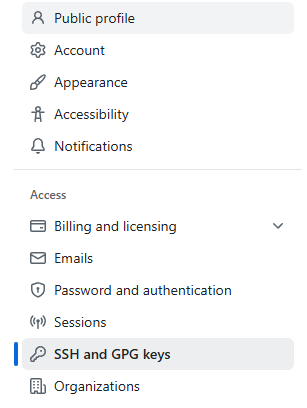

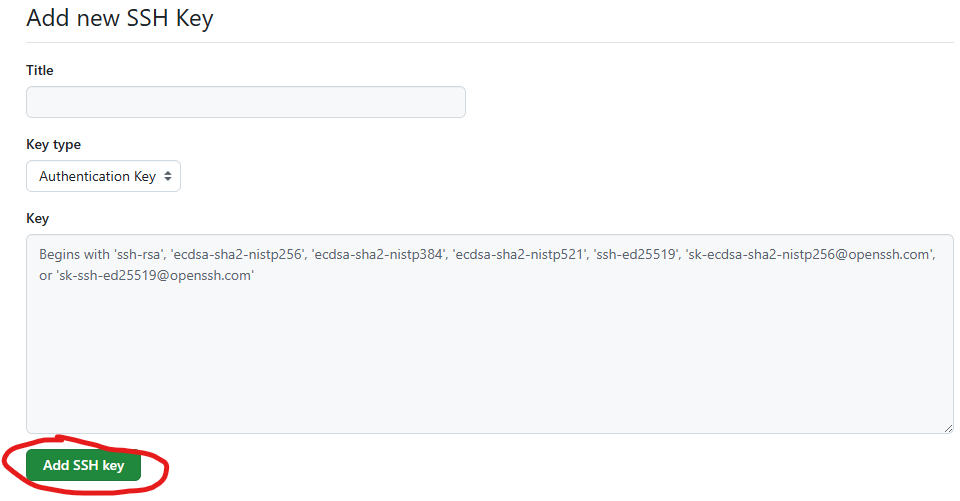
Paste the content of your pub key in text box above under the word “Key” and give it a name in textbox above under the word “Title”
🟩 Step 4 — tell SSH client which private key to use which is paired to the pub key used at GitHub earlier
e.g under current’s user .ssh folder
mkdir -p ~/.ssh
chmod 700 ~/.ssh
nano ~/.ssh/config
Add:
Host *
AddKeysToAgent yes
IdentityFile ~/.ssh/id_ed25519
ctrl-o to write and ctrl-x to close nano.
Then secure it:
chmod 600 ~/.ssh/config
🟩 Step 5 – testing it
ssh -T git@github.com
you should see sth like this:
Hi github_username! You've successfully authenticated, but GitHub does not provide shell access.