How can we stop an asynchronous long -running operation task?

We can use CancellationToken and pass it in the async long-running method and in the async method, we check the token for a cancel request and if one is requested we cancel the task.

e.g

async Task DoWorkAsync(CancellationToken token)
{
for (int i = 0; i < 100; i++)
{
token.ThrowIfCancellationRequested(); // stop if cancelled
await Task.Delay(1000); // simulate work
}
}

in the calling code:
--------------------

var cts = new CancellationTokenSource();
var task = DoWorkAsync(cts.token);

// Cancel after 5 seconds
cts.CancelAfter(5000);

try
{
await task;
}
catch(OperationCanceledException)
{
Console.WriteLine("Task was canceled!");
}

Example: Reading HTTP response with cancellation

using System;
using System.Net.Http;
using System.Threading;
using System.Threading.Tasks;

class Program
{
static async Task Main()
{
var cts = new CancellationTokenSource();
cts.CancelAfter(3000); // cancel after 3 seconds

using var httpClient = new HttpClient();
try
{
using var response = await httpClient.GetAsync(
"https://example.com/largefile",
HttpCompletionOption.ResponseHeadersRead,
cts.Token); // pass the cancellation token

using var stream = await response.Content.ReadAsStreamAsync(cts.Token);

byte[] buffer = new byte[8192];
int bytesRead;

while ((bytesRead = await stream.ReadAsync(buffer, 0, buffer.Length, cts.Token)) > 0)
{
// Process bytes (simulate work)
Console.WriteLine($"Read {bytesRead} bytes...");
}

Console.WriteLine("Download complete!");
}
catch (OperationCanceledException)
{
Console.WriteLine("Download was canceled!");
}
catch (Exception ex)
{
Console.WriteLine($"Error: {ex.Message}");
}
}
}
How Asynchronous Concurrency exceptions are handled

With Task.WhenAll, it allows Async Tasks to run simultaneously but how do we handle each task’s exception.

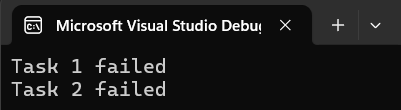
We will try catch it like normally do with synchronous programming. When each task throw exception it is stored in the AggregateException object which has an InnerExceptions, a ReadOnlyCollection<Exception> that contains the list of exceptions that each task thrown.

We can try catch and loop through its InnerExceptions collection to get each of Task’s exception:

Task t1 = Task.Run(() => throw new InvalidOperationException("Task 1 failed"));
Task t2 = Task.Run(() => throw new ArgumentException("Task 2 failed"));

Task allTasks = Task.WhenAll(t1, t2);

try
{
await allTasks; // await all tasks
}
catch
{
// Inspect all exceptions from allTasks
if (allTasks.Exception != null)
{
foreach (var ex in allTasks.Exception.InnerExceptions)
{
Console.WriteLine(ex.Message);
}
}
}

Info: allTasks.Exception is an object of AggregateException Type.

Output:

Parallelism vs Asynchronous Concurrency

  • Asynchronous concurrency: multiple tasks are in progress at the same time, often waiting on I/O (like HTTP requests, file reads). this can be done using Task.WhenAll(task1, task2, .., taskn). Task.WhenAll is great for asynchronous concurrency (I/O bound work like https request, db query etc), but not necessarily multithreaded CPU work.
  • Parallelism / multithreading: multiple threads actively running CPU-bound work simultaneously. e.g image processing

Deadlock in the context of Asynchronous programming and how to avoid it

First what is deadlock?

A deadlock occurs when two entities are waiting on each other, preventing either from moving forward. In multithreading, a deadlock happens when two or more threads are each waiting for resources locked by the other.

For example, imagine two lock objects: _lockA and _lockB.

  • Thread 1 acquires _lockA and then waits for _lockB.
  • Thread 2 acquires _lockB and then waits for _lockA.

Since both threads are holding one lock while waiting for the other to be released, neither can proceed. This circular waiting results in a deadlock.

So what is the deadlock in the context of asynchronous programming. It is the same definition, it is when two things are waiting on each others but in what are those two things we are talking about in term of asynchronous. Let have a look at this example:

var result = GetDataAsync().Result;
public async Task<string> GetDataAsync()
{
await Task.Delay(1000); // async wait
return "Done";
}
  • UI thread call .Result() so blocked waiting for GetDataAsync() to complete and it is a synchronous wait like .Wait()
  • Task.Delay(1000) completes after 1 second and tries to run the continuation (return "Done";) back on the UI thread.
  • But the UI thread is block so it can’t return hence GetDataAsync() can’t complete
  • So Deadlock, UI thread block waiting GetDataAsync() to complete but GetDataAsync cannot complete because UI thead is blocked.

To avoid it, never use .Result() or .Wait() because it is a main thread blocking so instead use await to not blocking the main thread or use .ConfigureAwait(false) to not return back (resume) onto the main thread. Though note that if you use .ConfigureAwait(false) we won’t be on UI thread (the calling thread) so if we need to update UI control we might have to marshal the call back on UI thread using controls .invoke:

e.g

myButton.Invoke(() =>
{
myButton.Text = "Clicked!";
});

WinForm: Async/wait vs raw worker thread regarding updating UI control on UI thread

1. Async/await

await Task.Delay(5000);
statusLabel.Text = "Work Completed!";

This won’t throw exception because

  • When we await, the method pauses, but the UI thread is free to process events.
  • After the await, the continuation automatically resumes on the original calling thread, which in a WinForms/WPF app is the UI thread.
  • That’s why we can update UI controls directly

2. Raw worker thread

Thread worker = new Thread(() =>
{
Thread.Sleep(5000);
statusLabel.Text = "Work Completed!"; //❌
});
worker.Start();
  • The worker thread runs completely separate from the UI thread.
  • Attempting to update a control directly causes an exception.
  • We must marshal the call to the UI thread:
statusLabel.Invoke(new Action(() =>
{
statusLabel.Text = "Work Completed!";
}));

So this is just to show the advantage of using asynchronous programming with async/await/Task which was introduced in 2012 alongside .NET Framework 4.5.

Before .Net Framework 4.5 we have to do the nasty thing you see with Invoke.

Synchronize Thread and Process using Mutex

A mutex (short for mutual exclusion) is a synchronization object used to control access to a shared resource so that only one thread or process can access it at a time.

Key points:

  1. Purpose: Prevent race conditions where multiple threads or processes try to read/write the same resource simultaneously.
  2. Scope:
    • In-process mutex: Synchronizes threads within the same application.
    • Named/system-wide mutex: Can synchronize access across different processes.
  3. How it works:
    • A thread/process requests the mutex.
    • If it’s available, it acquires the lock and enters the critical section.
    • If it’s already held, the thread waits until it’s released.
    • After finishing, the thread releases the mutex so another can acquire it.

Analogy: Think of a mutex like a single bathroom key: only one person can enter at a time, and everyone else must wait until the key is returned.

// In-process
var mutex = new Mutex();

// Named mutex (cross-process)
var namedMutex = new Mutex(false, “Global\MyMutex”);

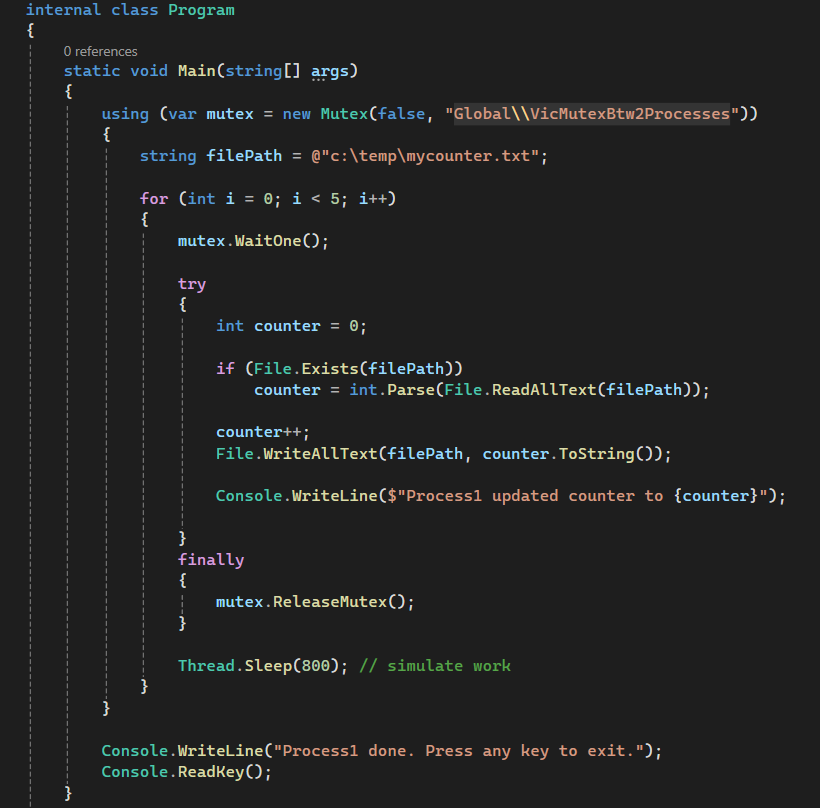
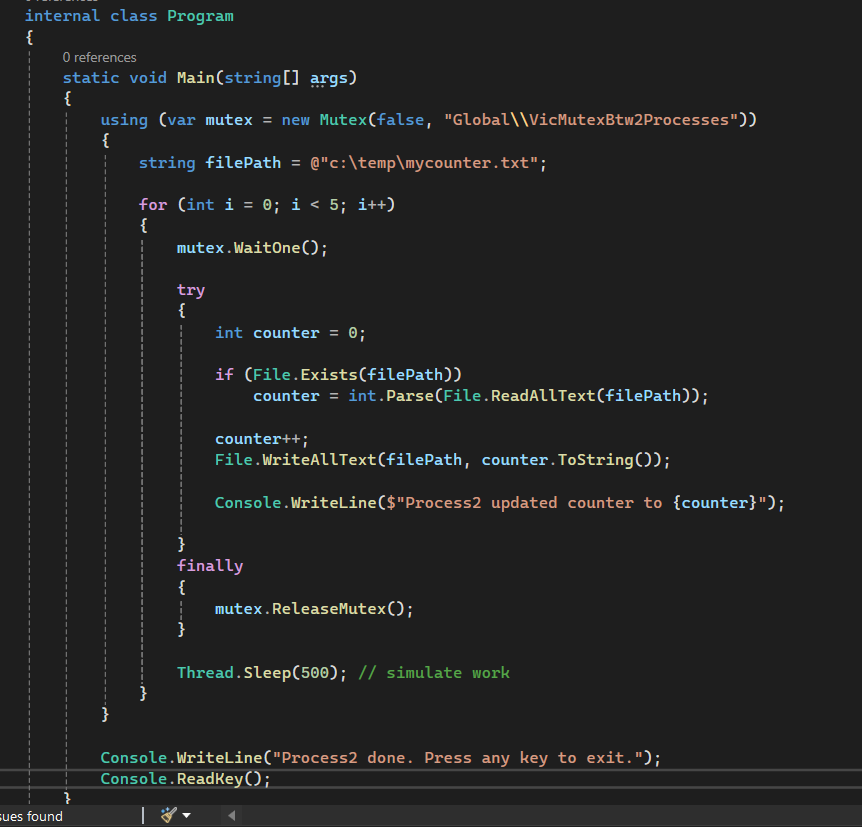
In this post, we will use named mutex or can be called cross-process mutex between two processes, process1 and process2 where both will read the counter from and write to the same file mycounter.txt. With mutex, it prevents Process1 and Process2 from overwriting each other at the same time by locking another process from access mycounter.txt till the lock, mutex here is released. In real world, multiple instance of web server might log to the same files so with mutex it will ensure they won’t overwrite each other’s logging.

Here is our process1 &2 console app with pipename mutex called “Global\VicMutexBtw2Processes” and do work 5 times reading and writing the field counter to and from mycounter.txt

Note: Global is keyword to tell the OS that it is a system-wide pipename that shared cross sessions whereas local is keyword to tell OS for within only current session.

P1

P2

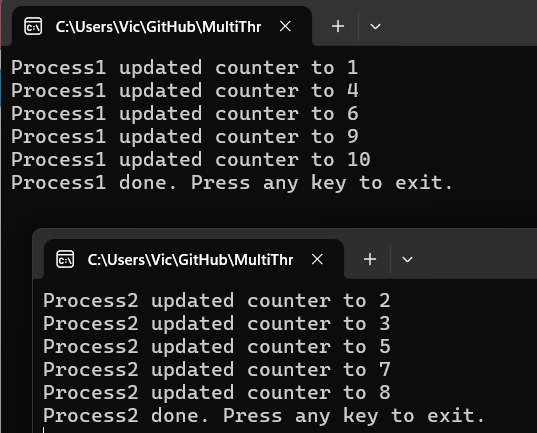
Running P1 & P2 at the same time:

As expected with mutex, even though P1 & P2 both read and write to the same file mycounter.txt, they synchronize each other instead of overwritten one another

because with shared mutex pipedname “Global\\VicMutexBtw2Processes“, it allows one process to access the shared resource one at a time

with its mutex.WaitOne() to acquire the lock (mutex) and mutex.ReleaseMutex() to unlock it (to release mutex)

Sample of P1 and P2: https://tinyurl.com/bddpnrrz

Multithreading with threadsafe using simple lock object

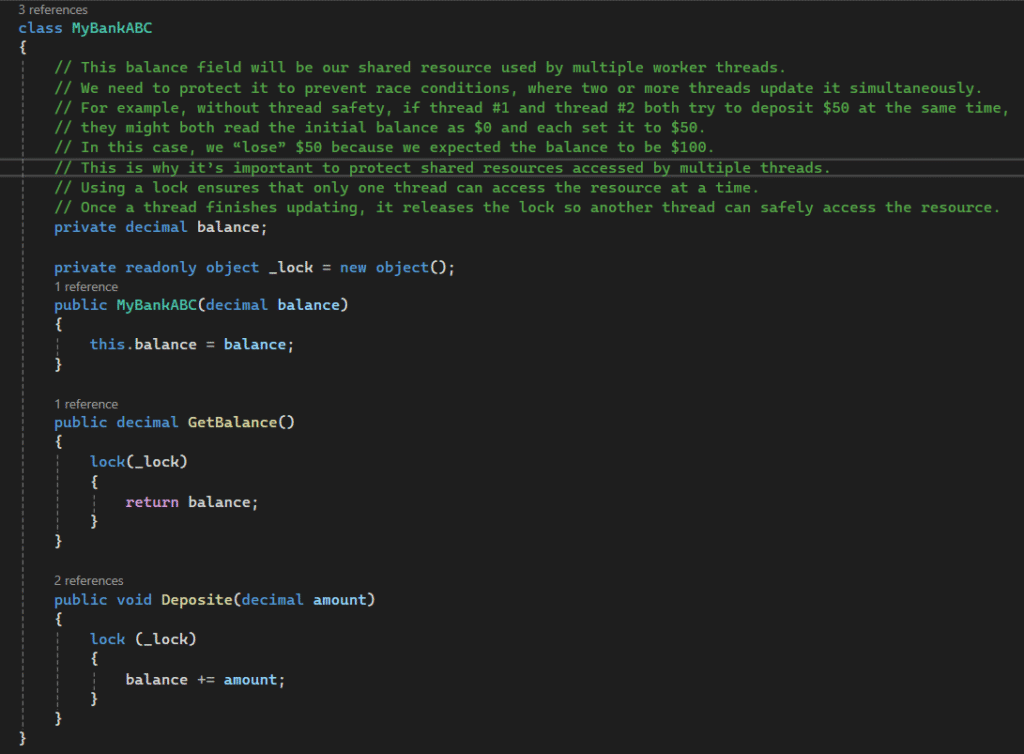
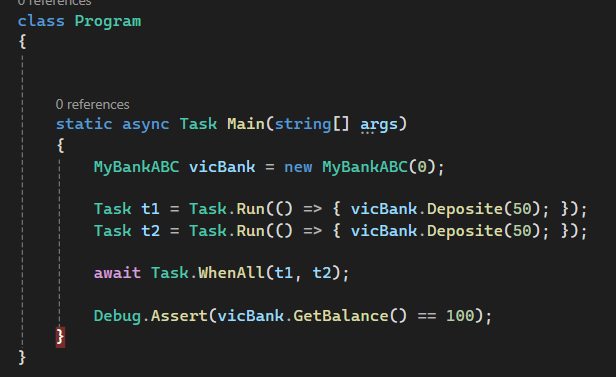
we will use a simple console app to demonstrate thread safe in multiple threading using lock object to prevent race condition. race condition could occur when more than one thread access the shared resource at the same time. For example below we have a bank account class that can be deposit amount of money to shared field balance.

We need to protect it to prevent race conditions, where two or more threads update it simultaneously. For example, without thread safety, if thread #1 and thread #2 both try to deposit $50 at the same time, they might both read the initial balance as $0 and each set it to $50. In this case, we “lose” $50 because we expected the balance to be $100.
This is why it’s important to protect shared resources accessed by multiple threads.
Using a lock ensures that only one thread can access the resource at a time.
Once a thread finishes updating, it releases the lock so another thread can safely access the resource.

Our main program running on the main thread instantiate the MyBankABC object and then kick off 2 workers threads t1 and t2 doing the deposit 50 at the same time. Since we protect our balance field with lock object ensuring only one thread can update this field so at the end we call assert to make sure that our balance is 100.

Complete console app: https://tinyurl.com/389b3kdp

Thread Best Practices

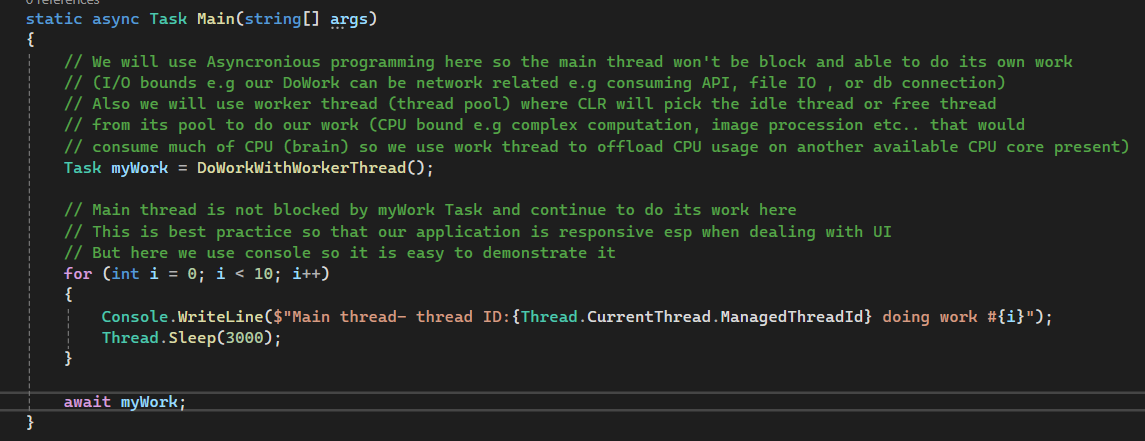
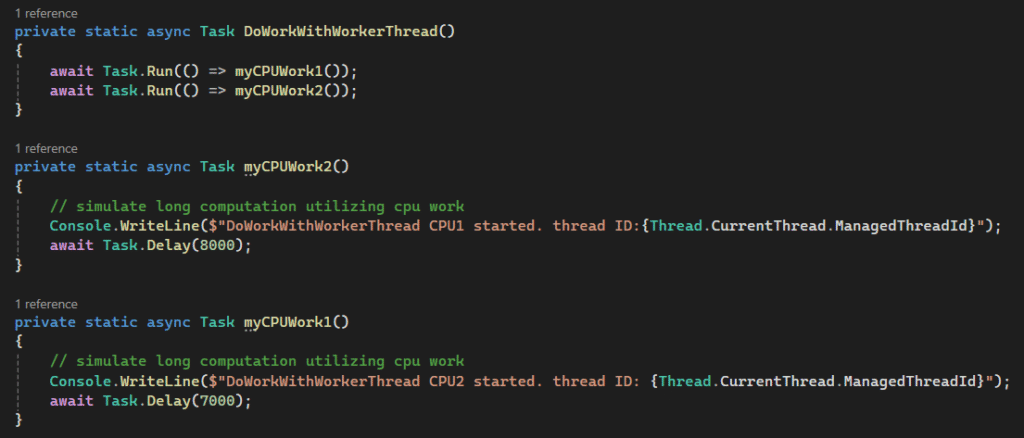
We’ll use async/await to enable asynchronous programming, allowing the main thread to remain unblocked and continue its work. For parallel programming, we’ll leverage tasks that run on worker threads from the thread pool (created and provided by CLR). Typically, asynchronous programming is applied to I/O-bound operations—such as network requests (e.g., consuming a REST API), file operations (read/write), or database access over a network connection.

To illustrate this concept, we’ll use a console application since it’s simple to set up and easy to demonstrate.

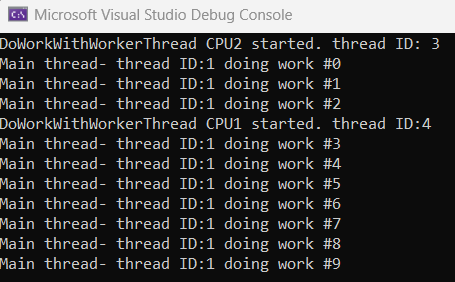
Output:

We will see that worker threads are running parralel doing its work while the main thread is not blocked and continueing to do its work as well.

Complete Console App: https://tinyurl.com/mv2cn5em

Linux Shell Exit Code

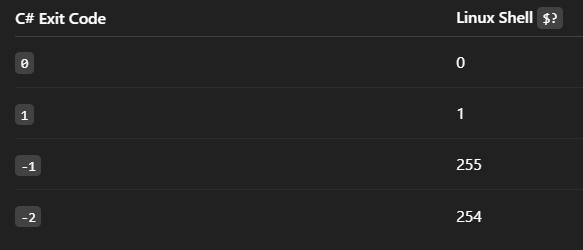
if your program returns -1, the linux shell receives the exit code as an 8-bit unsigned integer (0255)

So what would be the value that Linux shell would receive if you return -1 from your application?

The kernel takes your int return value and maps it to 8 bits unsigned.

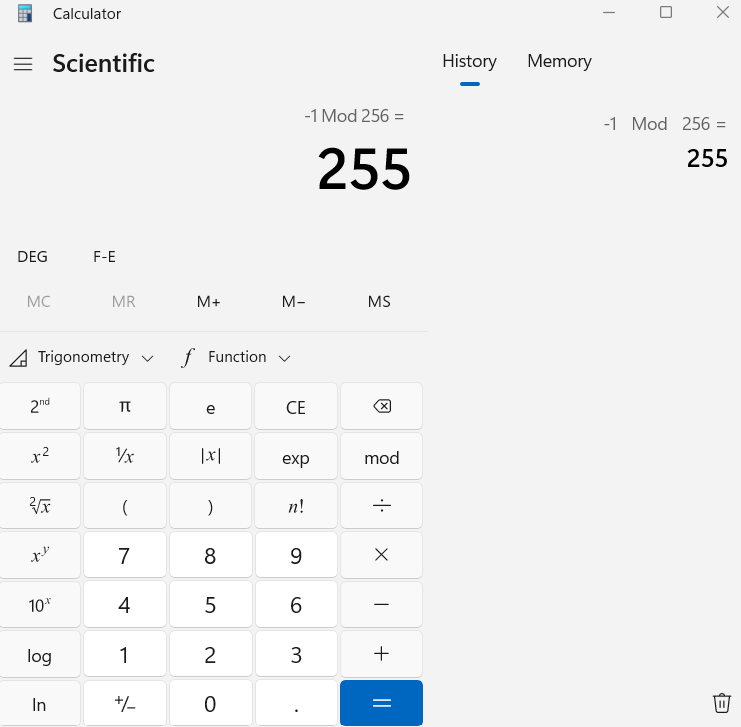
Negative numbers are converted using mod 256:

-1 mod 256 = 255

That’s why when you run:

./myprogram
echo $?

the echo will show 255 instead of -1 as you might have falsely expected.

Key takeaway

  • Linux exit codes are always unsigned 8-bit values (0–255).
  • Returning negative values in your program gets wrapped modulo 256.
  • Common convention:
    • 0 → success
    • Non-zero → error

Tip:

If you want to return an error code to the shell, always use 0–255 to avoid confusion. Returning -1 is technically allowed but becomes 255 in the shell.

Use 0 for success and 1–255 for errors to avoid confusion.

If you want a “standard” error code in Linux, just use 1 instead of -1

This is important to be aware of esp if you develop software using C# with mono or .net core where you might have a bash script that would automate task based on specific exit code from one of your linux C#/mono app.